
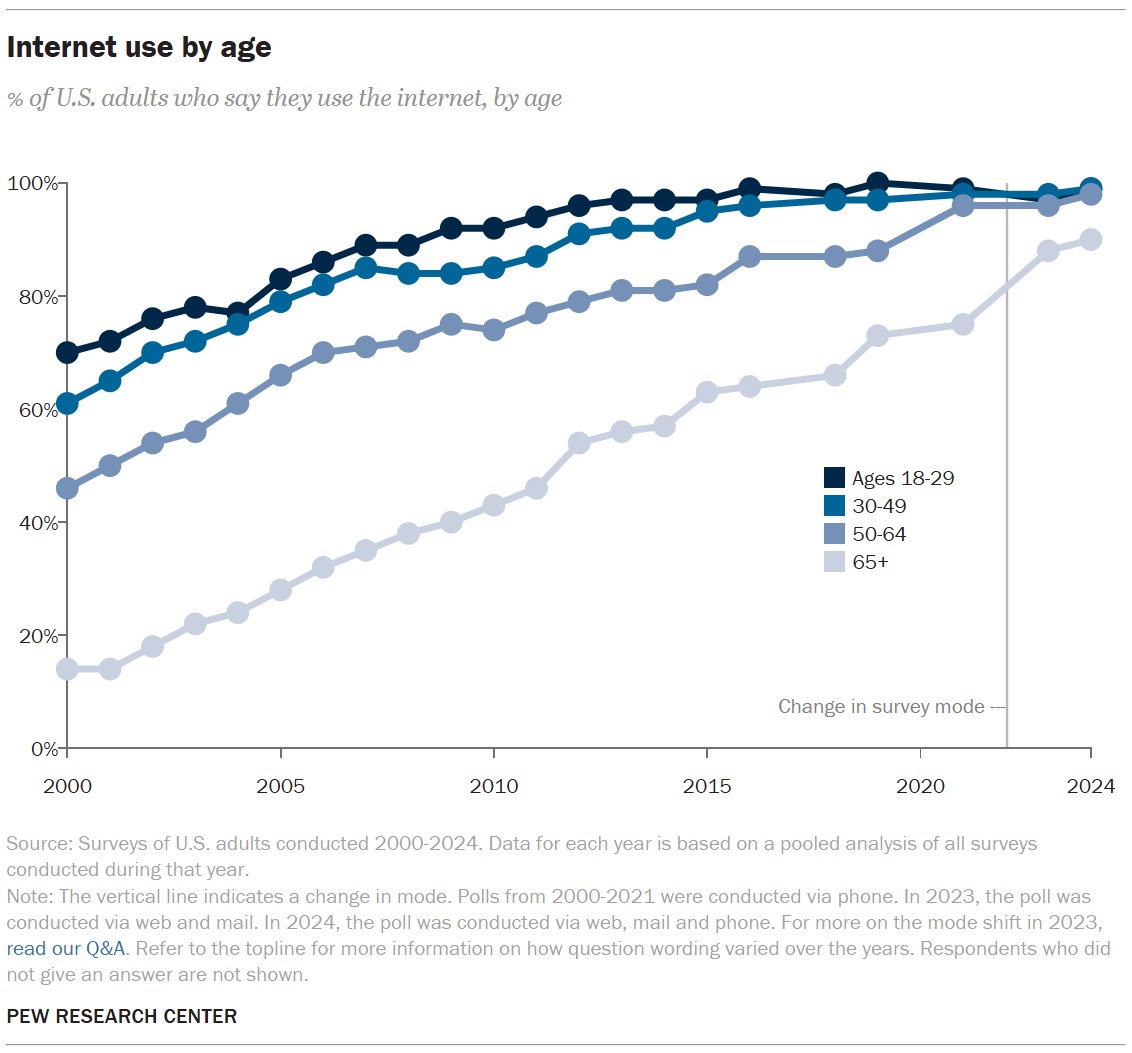
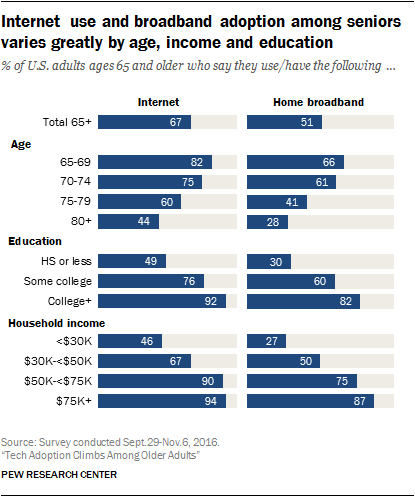
About 90% of U.S. adults age 65 and older use the internet, though adoption varies by age, income, health, and access.
The answer to “how many seniors use the internet” has changed sharply over the past decade. Internet access is now part of daily life for most older adults, helping them manage health care, banking, family contact, news, travel, and entertainment. Still, millions face barriers such as cost, poor internet service, small text, privacy risks, or limited digital skills. This guide explains the latest estimates, usage habits, benefits, and ways to make the internet easier and safer for seniors.
How many seniors use the internet in the United States?
Current national surveys suggest that about 9 in 10 U.S. adults age 65 and older use the internet in some form. This figure usually includes people who go online with a computer, tablet, smartphone, or other connected device.
The exact answer to how many seniors use the internet depends on the survey and its definition of “internet use.” Some studies measure whether a person has ever gone online. Others measure regular use, home broadband, smartphone ownership, or use of online services.
A useful summary looks like this:
• About 90% of adults age 65 and older use the internet.
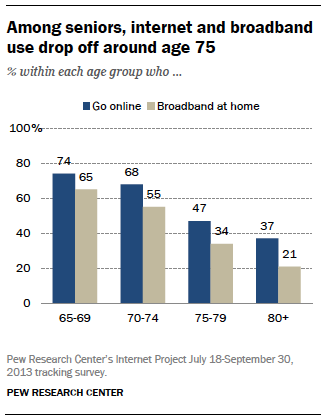
• Roughly 75% to 80% of adults age 75 and older use the internet, depending on the year and survey method.
• Internet use is lower among adults age 85 and older.
• Seniors with higher incomes and more education are more likely to have reliable internet access.
• Smartphone use has helped many older adults get online without owning a desktop computer.
These figures come from large national surveys, including recent data from Pew Research Center, the U.S. Census Bureau, the National Telecommunications and Information Administration, and AARP research. The numbers can differ because each organization asks different questions.
For example, “uses the internet” may mean checking email once a month. “Daily internet use” is a stronger measure. A person may also use a smartphone for calls and texts but avoid banking, shopping, or health care online.
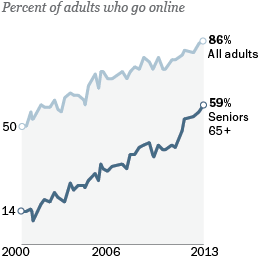
The broader trend is clear: internet adoption among seniors has risen greatly. In the early 2000s, only a small share of older adults went online. Today, most seniors use the internet at least occasionally, and many use it every day.

Internet use by senior age group
Age matters when examining how many seniors use the internet. A 65-year-old and an 85-year-old may have very different levels of comfort, access, and need.
Adults ages 65 to 74
Adults in this group have the highest internet adoption among seniors. Many were still working when email, online banking, video calls, and smartphones became common.
Common activities include:
• Reading news and weather reports
• Watching videos and television shows
• Using social media
• Sending email and messages
• Managing bank accounts
• Ordering medicine and household goods
• Using health portals
• Booking travel and appointments
Many adults in this age group also use a smartphone as their main way to go online. This can be convenient, but a small screen may make reading and typing harder.
Adults ages 75 to 84
Internet use drops among adults in their late 70s and early 80s. Some people in this group use the internet every day, while others use it only when a family member helps them.
Health, vision, hearing, memory, income, and prior work experience can all affect internet use. A person who used computers at work may feel comfortable online. Someone who never needed a computer may need more time and support.
Adults age 85 and older
The oldest adults are least likely to use the internet. Some have physical or cognitive challenges that make devices harder to use. Others may live in areas with weak broadband service or depend on a caregiver for online tasks.
This does not mean older adults do not want digital access. Many want to use video calls, online health services, digital photos, and news sites. The main issue is often support, device design, or affordability rather than a lack of interest.
What do seniors use the internet for?
Understanding how many seniors use the internet is helpful, but knowing what they do online gives a clearer picture. For many older adults, the internet is not just a source of entertainment. It is a practical tool for staying independent.
Staying in touch with family
Video calls, email, messaging apps, and social media help seniors stay close to family members who live far away. A grandparent can watch a birthday celebration through a video call or share photos with relatives in another state.
During periods of illness or limited travel, these tools can reduce loneliness. They cannot replace face-to-face contact, but they can help keep relationships active.
Managing health care
Many seniors use the internet to:
• Schedule medical appointments
• View test results
• Request prescription refills
• Read about health conditions
• Join telehealth visits
• Track exercise or medication
Online health tools can save time and reduce travel. However, health information should come from reliable medical organizations or a trusted health professional. Search results alone should not replace a doctor’s advice.
Banking and paying bills
Online banking allows seniors to check balances, pay bills, move money, and monitor transactions. These features can be especially useful for people who have trouble driving or walking to a bank.
Security is important. Seniors should avoid using online banking on public Wi-Fi, sharing passwords, or clicking unknown links in text messages and emails.
Shopping and delivery
Online shopping can help older adults order groceries, clothing, medicine, and household items. Delivery services may be helpful for people with limited mobility.
At the same time, online shopping can expose users to fake stores, misleading advertisements, and hidden fees. It is wise to check the seller, return policy, shipping cost, and payment method before buying.
Entertainment and learning
Seniors use the internet to watch movies, listen to music, read books, play games, take classes, and explore hobbies. Online learning can help people study history, cooking, languages, crafts, religion, or technology.
The internet can act like a large public library that stays open all day. The challenge is learning how to separate useful information from false or harmful content.
Why has senior internet use increased?
The rise in how many seniors use the internet comes from several connected changes. Devices are easier to use, online services are more common, and family members often provide help.
Smartphones are more accessible
A smartphone combines a phone, camera, map, web browser, video player, and communication tool. Seniors do not always need a computer or home office to get online.
Voice assistants also help people search, send messages, set reminders, and make calls. This can be useful for adults with limited vision or difficulty typing.
More services are online
Banks, doctors, government offices, stores, airlines, and utility companies now offer online services. This creates convenience, but it can also create pressure. A senior who prefers paper forms may feel left behind when an organization moves most services online.
Family support makes a difference
Children, grandchildren, friends, and caregivers often help seniors set up devices and solve problems. A calm 15-minute lesson can make a major difference.
In my experience helping older adults with basic technology, the biggest mistake is moving too fast. People often explain several steps at once, then assume the learner remembers them all. It works better to teach one task, write down the steps, and practice the task more than once.
The pandemic increased digital skills
The COVID-19 pandemic pushed many older adults toward video visits, online shopping, telehealth, and digital communication. Some people started using the internet because they had no easy alternative.
Many kept using these tools after in-person services returned. Once a person learns one useful task, such as ordering groceries, learning the next task often feels less difficult.
What prevents some seniors from using the internet?
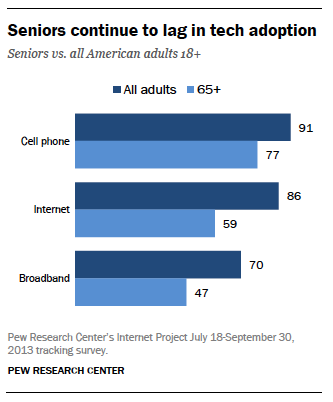
Even though most seniors use the internet, the digital divide has not disappeared. The answer to how many seniors use the internet should always include the people who remain offline and the reasons behind that choice.
Cost
Internet service, smartphones, tablets, computers, and repairs can be expensive. A fixed-income household may need to choose between broadband and other essential costs.
Affordable connectivity programs can help eligible households, but program rules and funding may change. Seniors can check with local libraries, community centers, internet providers, and government agencies for current options.
Poor broadband access
Some rural areas, remote communities, and low-income neighborhoods still lack fast and dependable service. A senior may own a smartphone but have limited data or an unreliable connection.
This creates a hidden problem. A person may technically have internet access but still be unable to complete a video visit, download a large form, or use an online class.
Physical limitations
Small text, low contrast, touch screens, and complicated menus can create problems for people with:
• Low vision
• Hearing loss
• Arthritis
• Tremors
• Reduced motor control
• Memory loss
Accessibility settings can help. Larger text, stronger contrast, screen readers, captions, voice control, and simplified home screens often make devices easier to use.
Fear of scams
Many older adults worry about identity theft, viruses, fake tech support, and financial fraud. These concerns are reasonable. Scammers often use urgent language and pretend to represent banks, delivery companies, government offices, or family members.
Fear can lead a person to avoid useful services. Basic safety training can help seniors use the internet with more confidence.
Lack of digital skills
Some seniors did not use computers during their careers. They may not know how to create a password, update an app, recognize a secure website, or recover an account.
That is not a personal failure. Digital systems change often, and even experienced users can make mistakes. Patient instruction is more useful than criticism.
How can seniors use the internet safely?
Knowing how many seniors use the internet also means understanding how to protect them. A few simple habits can reduce many common risks.
Use strong, unique passwords
Each important account should have its own password. Reusing one password across email, banking, and shopping accounts increases the damage if one account is hacked.
A password manager can create and store passwords. If that feels too complex, a trusted family member or technology instructor can help set one up.
Turn on two-factor authentication
Two-factor authentication adds a second step after a password. It may send a code by text, email, or an authentication app.
This extra step can stop a criminal who has stolen a password. It is especially important for email, banking, health, and social media accounts.
Pause before clicking
Scams often create panic. A message may claim that an account will close, a package is waiting, or a payment is overdue.
A good rule is to pause and verify. Instead of clicking the message link, open the official app or type the known website address into the browser.
Never share secret codes
Banks, technology companies, and government agencies do not normally ask for a one-time security code by phone or email. A scammer may ask for the code to take over an account.
Seniors should never share passwords, verification codes, Social Security numbers, or bank details with an unexpected caller.
Update devices and apps
Updates fix security problems and improve performance. Turn on automatic updates when possible.
Also use a screen lock. A PIN, password, fingerprint, or face recognition can protect personal information if a phone or tablet is lost.
Ask for help early
There is no shame in asking for help. It is better to ask a trusted person than to respond to a frightening message alone.
Libraries, senior centers, nonprofit groups, and community colleges often offer free or low-cost technology classes.
How to make the internet easier for older adults
The question of how many seniors use the internet is linked to another question: how many can use it comfortably and independently?
Families and service providers can improve the experience with a few practical steps.
Choose the right device
A tablet may be easier than a phone because it has a larger screen. A laptop may be better for writing, forms, and online banking. A smartphone may be best for calls, photos, maps, and emergency contact.
The best device is not always the newest one. It is the device that matches the person’s vision, hand strength, memory, budget, and daily needs.
Simplify the home screen
Place the most important apps on the first screen. These may include:
• Phone
• Messages
• Video calls
• Health care
• Weather
• Maps
Remove confusing apps from the main screen without deleting anything important. Fewer choices can make the device feel less stressful.
Increase text size and contrast
Most phones, tablets, and computers allow users to enlarge text. High contrast can make buttons easier to see.
Captions can help people with hearing loss. Voice commands can help people who find typing difficult.
Write simple instructions
A short printed guide can be more useful than a long explanation. Use plain steps such as:
-
Tap the blue email icon.
-
Tap the message from the doctor’s office.
-
Tap the link that says “Join visit.”
-
Enter the code.
-
Tap “Continue.”
Avoid technical words unless you explain them. Keep the guide near the device.
Practice without pressure
Let seniors practice while someone remains nearby. Do not take the device away at the first mistake.
One lesson I have learned is that confidence grows through small wins. Sending one email or joining one video call can make the next task feel much less intimidating.
What do the statistics leave out?
Statistics about how many seniors use the internet are useful, but they do not tell the whole story. A survey may count someone as an internet user even if that person goes online only once in a while.
The numbers may also miss important differences in quality. Two seniors may both report internet use, but one may have fast home broadband, a new laptop, and strong digital skills. The other may rely on a small prepaid phone with limited data.
Researchers may also group everyone age 65 and older together. That can hide major differences between a 65-year-old and a 95-year-old.
Other factors can affect results:
• Whether the survey includes people in nursing homes
• Whether the survey is conducted by phone, online, or in person
• Whether “internet use” includes smartphones
• Whether the survey measures access or frequent use
• Whether respondents feel comfortable reporting their digital habits
For this reason, it is best to view the numbers as estimates rather than exact counts. The broad pattern remains reliable: most U.S. seniors use the internet, but access and confidence are not equal.
Why senior internet access matters
Internet access can support independence, social connection, safety, and health. A senior who can refill a prescription, join a video appointment, or check a bank statement may need less outside help.
It can also help older adults stay active in their communities. They can find local events, join interest groups, attend religious services, learn new skills, or volunteer.
Still, internet access should not replace every offline option. People need choices. A government office, doctor, bank, or utility company should offer help to customers who cannot or do not want to use digital services.
Good digital inclusion means more than giving someone a device. It also requires:
• Affordable service
• Reliable connections
• Accessible design
• Basic training
• Technical support
• Strong privacy protections
• Offline alternatives
The goal is not to push every senior onto the internet. The goal is to make sure older adults can choose digital tools when those tools improve their lives.
Frequently Asked Questions: How Many Seniors Use the Internet
What percentage of seniors use the internet?
About 90% of U.S. adults age 65 and older use the internet, based on recent national estimates. The percentage is usually lower among adults age 75 and older and much lower among the oldest age groups.
How many seniors use the internet every day?
A large share of online seniors use the internet daily, but the exact figure depends on the survey. Daily use is generally lower than overall internet use because some people go online only for occasional tasks.
Do most seniors have smartphones?
Most adults under age 75 own or use a smartphone, while ownership is lower among adults in their late 70s and older. Some seniors use a smartphone as their main internet device, while others prefer tablets or computers.
Why do some seniors avoid the internet?
Common reasons include cost, poor broadband service, physical limitations, privacy concerns, fear of scams, and a lack of confidence. Some seniors also prefer in-person service or do not see a clear benefit in going online.
Is the internet safe for older adults?
The internet can be safe when seniors use strong passwords, two-factor authentication, software updates, and careful browsing habits. They should be especially cautious with unexpected calls, urgent messages, unknown links, and requests for money or security codes.
How can I help a senior learn to use the internet?
Start with one useful task, such as sending a message or joining a video call. Use large text, simple instructions, repeated practice, and a calm tone rather than trying to teach every feature at once.
Conclusion
So, how many seniors use the internet? In the United States, about 9 in 10 adults age 65 and older go online, although usage falls with age and varies by income, health, education, and broadband access.
Seniors use the internet to connect with family, manage health care, pay bills, shop, learn, and enjoy entertainment. Better accessibility, patient training, affordable service, and scam awareness can help more older adults use these tools safely and independently.
If you are helping a senior get online, begin with one practical goal and celebrate each small success. Explore trusted digital literacy resources, share these safety tips, and leave a comment with your own experience.

Michael Reynolds is a senior contributor at RetirementGazette.com, where he focuses on helping readers navigate the journey toward a secure and fulfilling retirement. With over a decade of experience in personal finance, retirement planning, and lifestyle writing, Michael combines practical strategies with easy-to-understand guidance tailored for both pre-retirees and those already enjoying their golden years.