
The best emergency call button for seniors is CallToU, thanks to its simple setup, strong range, and waterproof call buttons.
Picture an older parent alone in a bedroom or bathroom. A fall, dizzy spell, or sudden need for help can make a phone hard to reach. A wireless emergency call button gives that person a fast way to alert a caregiver nearby. I reviewed these senior alert buttons for range, ease of use, water resistance, receiver design, and value. These systems work best inside the home, where a receiver or caregiver can hear the alert. They do not replace a monitored medical alert service or a direct 911 device.
See the differences between my top picks at a glance.
CallToU 2-Button Caregiver Pager
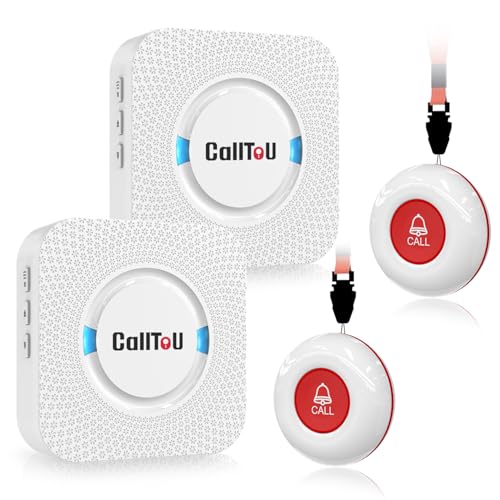
The CallToU two-button caregiver pager is my top pick for most homes. It includes two wireless call buttons and a caregiver receiver. That setup lets a senior place one button near the bed and another in a bathroom or living area. The listed 500+ foot range and through-wall design give it useful reach for many houses.
The buttons are waterproof, which matters near sinks, tubs, and toilets. The system also uses a loud whole-home alert, so a caregiver does not need to stare at a phone. It is a local alert system, not a monitored medical service. Still, its simple design makes it a strong choice for daily support at home.
Pros:
- Includes two call buttons for more than one room
- Listed 500+ foot through-wall range
- Waterproof buttons suit bathroom use
- Loud alert helps caregivers hear a call
- Simple design for seniors and family users
- Useful for bedside, bathroom, and chair placement
Cons:
- It does not call 911 or a monitoring center
- Actual range may change with walls and building layout
- The caregiver must stay close enough to hear or carry the receiver
What Amazon Buyers Are Saying
Buyer feedback commonly focuses on easy setup, loud alerts, and the value of having two buttons. Many shoppers choose it for a parent, patient, or spouse who needs quick help inside the home. As with most wireless systems, some buyers point out that real-world range depends on walls, floors, and interference. I recommend testing every room after installation.
My Recommendation
This is the best emergency call button for seniors when the main goal is a simple home alert with two waterproof buttons. It offers a useful mix of range, coverage, and ease of use. I would buy it for a caregiver who can respond in person. It is not the right tool for a senior who needs off-site emergency monitoring.
DAYTECH WiFi Caregiver Call Button

The DAYTECH WiFi caregiver call button takes a different approach. It can send an alert to a phone through an app, and the package includes two buttons, one wrist button, and one receiver. This design may help families who cannot stay in the same room all day. It also keeps a local receiver in the home for quick notice.
This model requires a 2.4GHz WiFi network. That requirement can be useful, but it also adds setup steps and another point to check. Families should confirm that the home network works well in the senior’s living area. I would also test app alerts before relying on the system.
Pros:
- Can provide app alerts to a caregiver’s phone
- Includes a wearable wrist button
- Includes a local receiver for home alerts
- Two-button setup supports more than one location
- Useful for families who need remote notification
Cons:
- Needs compatible 2.4GHz WiFi
- App alerts depend on network and phone settings
- Setup may feel harder than a basic wireless pager
What Amazon Buyers Are Saying
Feedback for app-based caregiver systems often centers on the benefit of phone alerts and the value of a wearable button. Buyers also tend to mention network setup and the need to adjust phone notifications. I would treat those points as practical setup concerns, not automatic faults. A stable WiFi signal and a caregiver who checks the app are both important.
My Recommendation
This is a good choice for families who want both a receiver and phone alerts. It may be the best emergency call button for seniors when the caregiver often works, travels, or lives nearby rather than in the same room. Choose a simpler pager if the senior or caregiver does not want app setup.
CallToU 500+ ft Wireless Pager

This CallToU system is built for straightforward home care. It pairs a wireless call button with a caregiver pager and lists a 500+ foot range through walls. The waterproof button can stay near a bed, chair, or bathroom. The design avoids a monthly fee and does not require a smartphone for the senior.
I like this type of setup for homes where a family member or caregiver is present. The receiver gives an audible alert when help is needed. Before use, I would place the button where the senior can reach it without standing. I would also make sure the receiver stays charged or powered as directed.
Pros:
- Clear home-care purpose
- Listed 500+ foot through-wall range
- Waterproof call button
- Does not depend on a senior using a phone
- Good fit for bedside and bathroom assistance
Cons:
- One button may not cover several rooms
- No listed off-site monitoring service
- Range can vary in concrete or multi-floor homes
What Amazon Buyers Are Saying
Common buyer themes for this model include fast setup, a loud pager, and peace of mind during home care. Shoppers also tend to value the lack of a required monthly plan. Some users may find that signal strength changes across floors or thick walls. That is why I suggest testing the exact locations before final installation.
My Recommendation
This model is worth considering for a basic caregiver alert system. It is less flexible than the two-button version, but it may cost less and feel easier to manage. I rate it highly for a single-room or small-home setup.
FullHouse 1000+ ft Emergency Pager

The FullHouse caregiver pager stands out with a listed range of more than 1,000 feet. That extra reach may help in a large home, detached living area, or broad property. It is designed to let a senior call family or a caregiver with a wireless button. The button carries an IP55 water-resistance rating according to the product information.
Range numbers come from open conditions, so walls and floors can reduce real performance. I would not assume that 1,000 feet means the same result in every home. Still, this model makes sense when standard short-range systems may not reach the caregiver. It remains a local alert system rather than a professional monitoring service.
Pros:
- Listed 1000+ foot range
- Useful for larger homes and wider layouts
- IP55 water resistance
- Designed for family or caregiver alerts
- Good option when range is the main concern
Cons:
- Actual range depends on walls and interference
- IP55 is not the same as full waterproofing
- It does not directly contact emergency services
What Amazon Buyers Are Saying
Buyers who select long-range pagers usually care most about signal reach and dependable alerts across a home. Reviews may also discuss ease of pairing and the usefulness of the receiver. As with any radio system, experiences can differ by building materials. I suggest testing the farthest bedroom, yard-side room, and bathroom before relying on it.
My Recommendation
The FullHouse pager is a strong pick for a large home. It is especially useful when the caregiver works in a distant room or on another floor. If the home is small, the extra range may not justify choosing it over a simpler CallToU system.
FullHouse Wristband Emergency Pager

This FullHouse version focuses on wearable access. A wristband can stay with the senior while they move from a bed to a kitchen or bathroom. The product information lists a 1,000+ foot range and IP55 water resistance. It also serves as a local caregiver calling system for a patient or disabled adult.
Wearability can solve a major problem: a button left on a table cannot help during a fall in another room. The caregiver still needs the pager within its working range. I would check the wristband fit and show the senior how to press it before daily use.
Pros:
- Wearable design keeps the call control close
- Listed 1000+ foot range
- IP55 water resistance
- Useful for seniors who walk around the home
- Supports quick family or caregiver notification
Cons:
- IP55 does not mean it can be submerged
- Wearable comfort varies from person to person
- It remains dependent on a nearby caregiver receiver
What Amazon Buyers Are Saying
Customer feedback for wearable alert buttons often highlights convenience because the senior can carry the button without remembering where it sits. Buyers may also value the long listed range. Common concerns with any wrist device include fit, accidental presses, and keeping it on during the day. I suggest a short practice routine so the user feels confident.
My Recommendation
I recommend this model for active seniors who move around the house. It may be the best emergency call button for seniors who often leave a bedside button behind. Choose the non-wearable FullHouse version if the senior prefers a fixed wall or bed button.
Wireless One-Button Caregiver Pager

This wireless caregiver pager keeps the system simple. It includes one call button and one receiver for home use. The product is aimed at seniors, children, patients, and anyone who may need help from another room. A single-button design can reduce confusion for users who do not want many controls.
This type of alarm works well when the senior spends most of the day in one room. It may also suit a child’s room or a patient area. The product information does not clearly state a specific range or water rating, so I would confirm those details before buying for a large home or bathroom.
Pros:
- Simple one-button operation
- Easy concept for many users to understand
- Includes a portable caregiver receiver
- Suitable for basic home assistance
- Can work for seniors, children, and patients
Cons:
- Only one call button is included
- Specific range is not clearly listed in the supplied details
- Water resistance is not clearly listed
What Amazon Buyers Are Saying
Buyers who choose a basic pager often like the small number of parts and the easy call process. The main questions tend to involve signal distance, alert volume, and receiver placement. Because homes differ, I would test the system before placing the button in a critical location. A simple product still needs regular battery checks.
My Recommendation
This is a practical entry-level option for a small space. It is not my first choice for a large home or bathroom use because the supplied specifications do not clearly confirm range and water protection. I would choose it when low complexity matters most.
Daytech Caregiver Pager and Help Watch

The Daytech caregiver pager combines a portable receiver with an emergency help watch. That design gives the senior a wearable way to request help. It also gives the caregiver a receiver that can move around the home. This can help in homes where the caregiver does not sit beside the senior all day.
The watch format may be more convenient than a fixed button for some users. It may be less suitable for a senior who dislikes wearing devices. Since the supplied product details do not clearly state a range or water rating, I would review the current listing and test the system before use in a bathroom.
Pros:
- Wearable help-watch design
- Portable receiver supports caregiver movement
- Made for home care and senior assistance
- Useful when a fixed button is easy to forget
- Simple local alert approach
Cons:
- Range details are not clearly stated in the supplied information
- Water protection is not clearly stated
- Some seniors may not want to wear a watch-style button
What Amazon Buyers Are Saying
Buyer interest in this model centers on the watch format and portable receiver. Users often want a button that stays with the senior instead of staying on a nightstand. The main points to check are comfort, battery care, and alert distance. I would include the senior in the setup process so the device feels helpful rather than intrusive.
My Recommendation
This is a sensible pick for a senior who will wear the help button. It offers a more mobile design than a wall-mounted call button. I would select it over a fixed model only after confirming that the user accepts the watch and that the receiver reaches the needed rooms.
CallToU Whole-House Wireless Pager

This CallToU model is aimed at whole-house caregiver use. It offers a wireless call button and receiver with easy setup and whole-house coverage. The waterproof button adds flexibility for use near a bathroom or kitchen. It provides a direct local alert without asking the senior to use a smartphone.
I see it as a balanced choice for families who want a familiar pager design. The system works best when the caregiver carries or places the receiver where the alert can be heard. I would label the button and practice the call routine with the senior. That small step can reduce stress during a real need.
Pros:
- Designed for whole-house home care
- Easy setup approach
- Waterproof call button
- Useful for seniors and patients
- Does not require app use by the senior
Cons:
- It is not a monitored medical alert plan
- Coverage still depends on home construction
- One button may not suit homes with many high-risk areas
What Amazon Buyers Are Saying
Buyers commonly look for easy setup and a clear alert sound in this type of system. The waterproof button also appeals to families who want bathroom access. As with other local pagers, buyers may report different results in large or multi-level homes. I recommend a room-by-room test before deciding where to mount it.
My Recommendation
This is a dependable option for basic home support. It may be a better fit than an app-based system for a senior who wants fewer steps. I would choose the two-button CallToU model if the senior needs access in several rooms.
CallToU WiFi Wireless Caregiver Pager

The CallToU WiFi caregiver pager combines a call button, watch button, receiver, and app alert. It supports a 2.4GHz WiFi connection. This gives families more than one way to notice a call. The watch button can stay with the senior, while the receiver covers the home.
The app feature may help a caregiver who is away from the house for part of the day. It also means the family must maintain the WiFi connection and phone notifications. I would test the receiver and app separately. That makes it easier to spot a network issue before an emergency.
Pros:
- Includes app alert capability
- Includes a watch button and a standard call button
- Includes a local receiver
- Uses 2.4GHz WiFi
- Offers more than one alert path
Cons:
- Requires WiFi and phone setup
- App alerts may fail if notifications are blocked
- Water resistance is not clearly stated in the supplied details
What Amazon Buyers Are Saying
Buyers who consider WiFi caregiver pagers often like the chance to receive alerts away from the home. They also value the local receiver and wearable button. Setup and network compatibility remain the main points to check. I would not rely on the app until the family has tested alerts at different times and from more than one phone.
My Recommendation
This is a strong choice for a connected home-care plan. It may be the best emergency call button for seniors when family members need phone alerts as well as a local chime. Choose a basic CallToU pager if you want fewer technical steps and no WiFi dependence.
How to Choose the Best Emergency Call Button for Seniors
Choosing the best emergency call button for seniors means matching the alert system to the home, the senior, and the caregiver. A low-cost button is not useful if the senior cannot reach it. A long-range pager is not enough if nobody hears the receiver. I suggest checking these three areas before you buy.
1. Match the Button to Daily Movement
First, think about where the senior spends time. A fixed button can work well beside a bed or recliner. A wrist button works better for someone who walks to the kitchen or bathroom. For higher fall risk, place buttons in more than one key area.
Choose a waterproof or water-resistant model for bathroom use. Check the exact rating. “Water-resistant” does not always mean safe for a bath or full submersion. Mount or place the button where the senior can reach it from the floor if they fall.
2. Test Range, Alerts, and Power
Range claims often use open space. Floors, brick, concrete, metal, and other electronics can reduce signal distance. Test the emergency call button for seniors from the bedroom, bathroom, basement, and any outdoor area that matters.
Check the alert volume and receiver position. A receiver in a closed room may not help. Ask who will respond when the alert sounds. Also set a battery check plan. A call button with a weak battery can create false confidence.
3. Decide Between Local, WiFi, and Monitored Help
A local pager alerts someone nearby. It usually offers simple setup and no monthly monitoring fee. A WiFi model can send an app alert, but it needs a working network and a caregiver who checks the phone.
These products are not the same as a monitored medical alert service. A monitored service may connect to trained staff. A home pager does not automatically call 911. If the senior lives alone or may be unable to reach a phone, compare a home pager with a professional medical alert plan.
Final Verdict: Which Should You Buy?
For most families, the CallToU two-button pager is the best emergency call button for seniors. It offers two waterproof buttons, useful range, and simple local alerts. Choose FullHouse for a large home, or a WiFi model for app notifications.
Buy based on reach, button access, and caregiver response. The right senior alert button can add comfort and speed during daily home care.
FAQs Of best emergency call button for seniors
Does an emergency call button for seniors call 911?
Most home caregiver pagers do not call 911. They alert a nearby caregiver. A monitored medical alert service may offer emergency response, so check the product type before buying.
What is the best emergency call button for seniors who live at home?
The CallToU two-button pager is my top home pick. It offers two waterproof buttons, a caregiver receiver, and a listed 500+ foot through-wall range.
Are senior emergency call buttons waterproof?
Some are waterproof, while others only offer water resistance or do not list a rating. Check the exact product details before using a button in a bathroom or near a tub.
Do wireless senior alert buttons need WiFi?
Basic pager systems usually do not need WiFi. App-based models do need a compatible network, often 2.4GHz WiFi, plus phone notifications.
Where should I place an emergency call button for an older adult?
Place it beside the bed, near the main chair, and in or near the bathroom. Keep it low enough to reach after a fall, and test the alert from each important room.

Michael Reynolds is a senior contributor at RetirementGazette.com, where he focuses on helping readers navigate the journey toward a secure and fulfilling retirement. With over a decade of experience in personal finance, retirement planning, and lifestyle writing, Michael combines practical strategies with easy-to-understand guidance tailored for both pre-retirees and those already enjoying their golden years.