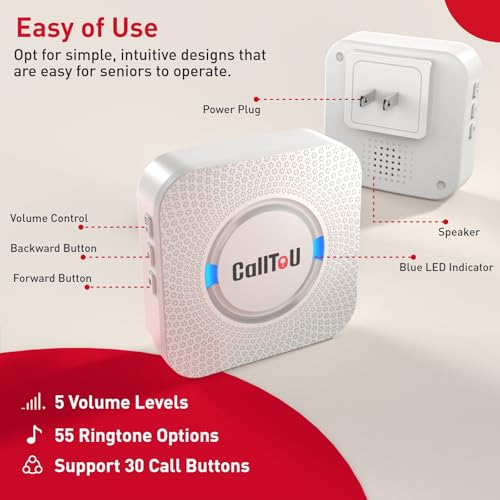
The best caregiver call buttons offer simple alerts, strong range, waterproof controls, and dependable home coverage.
When an older adult needs help, calling out may not work. A caregiver call button gives that person a simple way to reach someone fast. It can help at home, in a bedroom, near a bathroom, or in a small care setting. I reviewed the key features, layouts, range claims, and setup needs of these systems to help you find a practical fit. The right choice depends on the number of users, home size, alert style, and how easy the button is to press.
See the differences between my top picks at a glance.
CallToU 2-Button Caregiver Pager
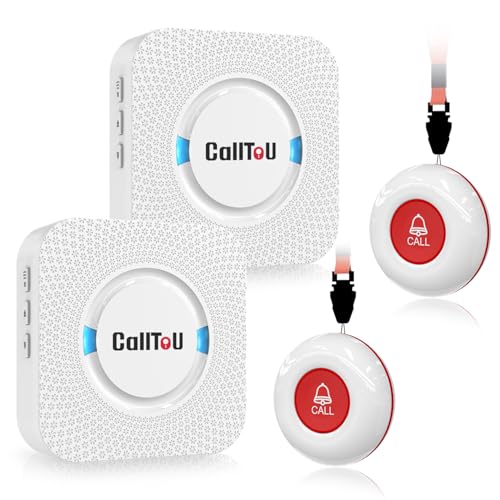
This CallToU kit includes two wireless call buttons and a caregiver pager. That setup suits a home where one person needs help from more than one location. The listing states a 500-plus-foot through-wall range, although real range can change with walls, floors, and other wireless devices. The buttons are also listed as waterproof, which makes them useful near common spill zones.
I like the balance between coverage and simplicity here. Two buttons can sit in separate rooms, or one can stay with the user while the other remains near a bed or chair. The loud alert helps a caregiver hear a call across much of the home. Still, buyers should test the signal after installation rather than rely only on the listed distance.
Pros:
- Includes two wireless call buttons.
- Useful 500-plus-foot through-wall range claim.
- Waterproof button design supports bathroom use.
- Loud alerts can help across a busy home.
- Works well for two call locations.
- Simple design may suit older users.
Cons:
- Actual range may drop in homes with thick walls.
- It does not replace emergency medical response service.
- Two buttons may be more than one user needs.
What Amazon Buyers Are Saying
Buyer feedback for caregiver pager systems often focuses on loudness, setup, button response, and signal strength. For this type of kit, the most useful reviews are those that explain performance across floors and behind closed doors. Complaints to watch for include range changes in larger homes, battery needs, and alerts that may feel too loud in a small room. Read recent reviews to confirm the current package and user experience.
My Recommendation
I recommend this model for families that need two call points without a complex display. It offers a strong feature mix for basic home care and is one of the best caregiver call buttons for a two-room setup. Confirm the range in your home and check the included power and battery details before buying.
| Category | Rating |
|---|---|
| Alert coverage | 4.5/5 |
| Ease of use | 4.5/5 |
| Waterproof practicality | 4.5/5 |
| Value | 4.5/5 |
| Overall Rating | 4.5/5 |
CallToU Single-Button Caregiver Pager

This single-button CallToU system keeps the task clear. The user presses one waterproof call button, and the caregiver receives an alert from the wireless pager. The product listing states easy use and a 500-plus-foot through-wall range. That makes it a good match for a bedroom, apartment, or small home care plan.
A one-button layout can reduce confusion for a senior who does not want menus or screens. It also gives families a focused option when only one person needs help. The main trade-off is that the receiver may not identify several rooms or users. Test the alarm from the places where the user may need help most.
Pros:
- Very simple one-button operation.
- Waterproof call button for daily home use.
- 500-plus-foot through-wall range claim.
- Good fit for one senior or patient.
- Wireless design avoids long signal cables.
- Easy alert path for basic assistance.
Cons:
- One button limits multi-room tracking.
- No listed voice announcement or number display.
- Signal performance depends on the home layout.
What Amazon Buyers Are Saying
When buyers review a simple caregiver call button, they often care most about whether the button feels easy to press and whether the receiver can be heard. Reviews may also mention pairing, battery replacement, and false presses. Look for comments from people with a similar floor plan. A product that works well in a small apartment may need a range test in a larger house.
My Recommendation
This is a sensible choice when simplicity matters more than room identification. I would choose it for one user and one main care area. It earns a strong score among the best caregiver call buttons for basic assistance, but it is not the best option for a facility or a home with many call points.
| Category | Rating |
|---|---|
| Ease of use | 4.7/5 |
| Alert reach | 4.3/5 |
| Daily practicality | 4.4/5 |
| Value | 4.5/5 |
| Overall Rating | 4.5/5 |
CallToU Six-Button Voice Alert System

This CallToU system includes six waterproof call buttons, one voice announcement feature, and an LED number display. Those features help a caregiver tell which button sent the alert. That detail matters when several rooms, beds, or users share one receiver. The supplied listing presents it for elderly users, patients, home care, and hospital-style use.
The six-button design offers more organization than a basic alarm bell. A caregiver can label each button by room or user during setup. Voice alerts may also help when the receiver is not in direct view. Because the supplied listing does not state a specific range, I would test every installed location before depending on it.
Pros:
- Six waterproof call buttons support many locations.
- LED number display helps identify the calling button.
- Voice announcements add another alert method.
- Useful for shared care spaces.
- Supports room-by-room organization.
- More informative than a single-tone alarm.
Cons:
- More setup work than a one-button system.
- Supplied listing does not state a range figure.
- Extra buttons may be unnecessary for one user.
What Amazon Buyers Are Saying
For multi-button alert systems, buyers usually focus on number display clarity, voice volume, button pairing, and daily reliability. Reviews can reveal whether labels stay easy to understand after installation. Some users may also discuss how they manage several buttons in one home. Check current buyer comments for details about the receiver display and the exact included accessories.
My Recommendation
I recommend this model for a busy home, small care group, or room-based alert plan. It is among the best caregiver call buttons when identifying the source of an alert matters. It costs more effort to organize, but the display and voice features can make that effort worthwhile.
| Category | Rating |
|---|---|
| Room identification | 4.8/5 |
| Alert clarity | 4.7/5 |
| Waterproof design | 4.5/5 |
| Setup value | 4.2/5 |
| Overall Rating | 4.5/5 |
Wireless One-Button SOS Caregiver Pager

This wireless caregiver pager pairs one call button with one receiver. The listing presents it as a medical life alert system for seniors, kids, patients, and home caregivers. It also describes SOS, panic call, nurse call, and patient assistance uses. The basic design can work well when one person needs a direct way to ask for help.
I see this as a practical starter system rather than a full monitoring service. It can support quick household alerts, but it does not by itself contact emergency services. Place the button where the user can reach it from a bed, chair, or other regular rest spot. Then test the receiver at different times of day and from each key location.
Pros:
- Simple one-button SOS-style operation.
- Useful for seniors, children, or patients.
- Wireless setup can reduce installation work.
- Supports home caregiver communication.
- Compact system for a single user.
- Can serve as a basic assistance buzzer.
Cons:
- It is not a monitored emergency response service.
- Supplied listing does not state a range figure.
- One button does not identify different rooms.
What Amazon Buyers Are Saying
Buyers of basic SOS pagers tend to discuss how fast the alert sounds, how easy the button is to press, and whether the receiver reaches the needed room. Common points to verify include battery life, receiver volume, and setup instructions. Because this product has one button and one receiver, reviews from single-user homes offer the most useful comparison. Read recent feedback before treating it as a safety device.
My Recommendation
This product is worth considering for a low-cost, single-user alert path. I would not use it as the only plan for a person who may face a serious medical emergency. As one of the best caregiver call buttons for simple household help calls, it earns a solid rating when expectations stay clear.
| Category | Rating |
|---|---|
| Simple operation | 4.6/5 |
| Single-user fit | 4.5/5 |
| Alert usefulness | 4.2/5 |
| Feature depth | 3.9/5 |
| Overall Rating | 4.3/5 |
CallToU Dual-Receiver Caregiver Pager

This CallToU package includes one waterproof SOS button and two plug-in receivers. The product listing states a 500-plus-foot range. Two receivers can help a caregiver hear the alert from separate parts of a home. This design can reduce the risk of missing a call when one receiver sits far from the main living area.
I consider the dual-receiver setup its key advantage. One receiver can stay near the caregiver, while another can sit upstairs or in a work area. The single button keeps operation easy for the person asking for help. Since the product has only one call button, it suits one user better than a multi-patient setting.
Pros:
- Two plug-in receivers improve alert placement.
- One waterproof SOS button is easy to understand.
- 500-plus-foot range claim supports larger homes.
- Useful across two floors or care zones.
- Simple system for one senior or patient.
- Whole-home listening is easier with two receivers.
Cons:
- Only one call button is included.
- Receivers need suitable outlets in key areas.
- Actual range varies with walls and interference.
What Amazon Buyers Are Saying
For two-receiver pager kits, buyers commonly assess whether both receivers respond at the same time and whether the alert remains clear across floors. Reviews may also mention outlet placement and the ease of carrying or mounting the button. Pay attention to comments about signal reliability in homes like yours. Current reviews can also confirm the package contents.
My Recommendation
I recommend this model for a single user in a medium or large home. It is one of the best caregiver call buttons when the caregiver spends time in two separate areas. Choose another system if you need room numbers, several users, or many buttons.
| Category | Rating |
|---|---|
| Coverage layout | 4.7/5 |
| Receiver usefulness | 4.7/5 |
| Button simplicity | 4.5/5 |
| Multi-user support | 3.7/5 |
| Overall Rating | 4.4/5 |
SavvyMate 15-Button Caregiver Call System
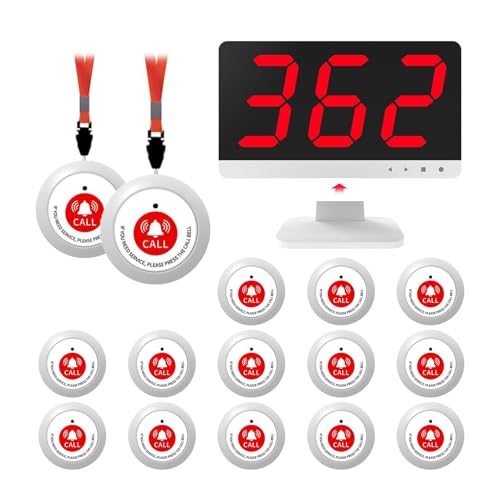
The SavvyMate system is built for a much larger care setup. It includes 15 waterproof buttons and lists a 1,000-foot long-range calling system. The product is aimed at seniors, patients, nurses’ stations, and larger care environments. Fifteen call points allow a facility or large home to cover many rooms.
This is not the system I would buy for one bedroom. It makes more sense when several people need access to a central alert point. Waterproof buttons can support areas where spills may occur, but every button still needs clear labeling and regular testing. The 1,000-foot figure is a listed claim, not a guarantee for every building.
Pros:
- Fifteen buttons support many users or rooms.
- Waterproof design suits active care areas.
- Listed 1,000-foot long-range capability.
- Useful for nurses’ stations and facilities.
- Scales better than small home systems.
- Can create a broad room-call network.
Cons:
- Too large for most single-user homes.
- Requires careful button labeling and testing.
- Building materials can reduce the listed range.
What Amazon Buyers Are Saying
Buyers of large call systems usually care about button registration, alert recognition, range, and daily management. Reviews from care homes can be more useful than reviews from small apartments. Look for reports about how staff identify calls and maintain many buttons. Also check the current listing for receiver details, power needs, and any installation limits.
My Recommendation
I recommend SavvyMate for a facility, group home, clinic, or large property with many call locations. It offers the broadest capacity in this group. For ordinary home care, it may add cost and work without adding useful value.
| Category | Rating |
|---|---|
| Capacity | 4.9/5 |
| Facility suitability | 4.8/5 |
| Range potential | 4.5/5 |
| Home value | 3.6/5 |
| Overall Rating | 4.5/5 |
CallToU Whole-Home Caregiver Pager

This CallToU system focuses on easy setup and whole-house coverage. The listing describes it as a wireless caregiver call button and medical alert system for seniors, patients, and home caregivers. It also lists a waterproof call button and peace-of-mind use. The broad product description makes it a flexible choice for general home care.
I would consider this model when the buyer wants a straightforward system but does not need a large room display. Its value depends on the exact button and receiver contents, so review the current Amazon listing before ordering. As with any wireless alert, test it from the bed, bathroom, and living areas. Do not assume “whole house” means every room in every building.
Pros:
- Designed for general whole-home care.
- Wireless setup can keep installation simple.
- Waterproof call button supports daily use.
- Fits seniors, patients, and caregivers.
- Useful for basic peace-of-mind alerts.
- Less complex than large multi-button systems.
Cons:
- Supplied listing does not give a precise range.
- Exact package details should be checked before purchase.
- No stated room-number display in the supplied title.
What Amazon Buyers Are Saying
Buyers of whole-home alert kits often discuss setup time, alert loudness, and performance in bedrooms or bathrooms. Reviews may also point out differences between small and large homes. I suggest checking current comments for receiver placement and button response. Those details give a better idea of fit than a broad coverage phrase alone.
My Recommendation
This is a useful middle-ground option for basic home care. I would choose it when the family wants a simple alert without six or fifteen call points. It belongs on a best caregiver call buttons shortlist, but buyers should verify the package and test the signal at home.
| Category | Rating |
|---|---|
| Home-care fit | 4.4/5 |
| Ease of setup | 4.4/5 |
| Button practicality | 4.3/5 |
| Information clarity | 4.0/5 |
| Overall Rating | 4.3/5 |
CallToU 10-Button Display System

This CallToU system includes ten waterproof nurse alert call buttons and one display receiver. The listing presents it for clinics, nursing stations, restaurants, nursing homes, and other shared spaces. Ten buttons allow staff to assign alerts to rooms, beds, tables, or work areas. The display receiver can offer more useful information than a basic sound alone.
This product is best for organized care or service environments. It may be excessive for a parent living in a small apartment, yet useful when several people need a clear way to call one station. Before installation, create a simple map of every button. A clear map helps staff respond faster and helps avoid confusion during a busy shift.
Pros:
- Ten buttons cover many rooms or service points.
- Waterproof buttons support demanding daily use.
- Display receiver helps identify a call source.
- Fits clinics and nursing stations.
- Useful for structured care workflows.
- More scalable than one-button systems.
Cons:
- May be too complex for a private home.
- Supplied listing does not state a range figure.
- Requires a clear labeling and response plan.
What Amazon Buyers Are Saying
For a ten-button calling system, buyer feedback matters most when it explains installation, display visibility, alert recognition, and long-term daily use. Facility buyers may also mention whether staff can assign and track button numbers with ease. Check current reviews for the supplied receiver and button count. Real-world reports from similar workplaces offer the best guidance.
My Recommendation
I recommend this system for a small clinic, nursing station, care home, or multi-room service area. It offers strong capacity without the fifteen-button scale of the SavvyMate model. For a single family caregiver, I would select a smaller and simpler kit.
| Category | Rating |
|---|---|
| Multi-room capacity | 4.8/5 |
| Display usefulness | 4.6/5 |
| Facility fit | 4.7/5 |
| Home simplicity | 3.7/5 |
| Overall Rating | 4.4/5 |
How to Choose Best Caregiver Call Buttons
Choosing the best caregiver call buttons starts with the user, the home, and the response plan. A button should be easy to reach and easy to press. The receiver should alert the right person from the needed rooms. You should also know what the system can and cannot do before you depend on it.
1. Match the Button Count to the Care Plan
One person may need one button beside a bed or chair. A large home may need buttons in a bedroom, bathroom, kitchen, and living room. A facility may need six, ten, or fifteen call points. Extra buttons add cost and setup work, so buy enough coverage without creating confusion.
For several users, choose a system that identifies the calling button. An LED number display or voice alert can help. Label each button with a room name or user name. Keep a printed list near the receiver so a new caregiver can respond with confidence.
2. Test Range, Water Protection, and Alert Sound
Range numbers come from controlled conditions. Walls, floors, metal, concrete, and other devices can reduce wireless distance. Test the call button from every place where the user may need help. Include the bathroom, since it often sits behind several walls.
A waterproof button can handle splashes better than a standard button. Still, check the product instructions for the exact water protection level. Test the receiver volume during the day and at night. A sound that works in a quiet room may not work near a television or kitchen appliance.
3. Consider Power, Setup, and Emergency Limits
Check whether the receiver plugs into a wall and whether the button uses a battery. Keep spare batteries in a known place. Test the system on a schedule, such as once each week. A call button cannot help if the battery is flat or the receiver is unplugged.
Also remember that a home caregiver pager is not the same as a monitored medical alert service. Most products in this review send a signal to a nearby receiver. They do not automatically contact 911, family members, or a call center. Create a backup plan for serious emergencies, and teach every caregiver how to respond.
Final Verdict: Which Should You Buy?
For most homes, I recommend the CallToU two-button pager because it balances range, waterproof buttons, and simple use. Choose the six-button display model when room identification matters.
The best caregiver call buttons improve daily communication, but they need testing and a clear response plan. Pick the button count and coverage that match your real care needs.
FAQs Of best caregiver call buttons
What are the best caregiver call buttons for home use?
The CallToU two-button pager is a strong home choice. It offers two call points, waterproof buttons, and a listed 500-plus-foot through-wall range.
Do caregiver call buttons contact emergency services?
Most wireless caregiver pagers only alert a nearby receiver. They do not replace a monitored medical alert service or an emergency call plan.
Are wireless caregiver call buttons waterproof?
Several products in this review list waterproof call buttons. Check the current product instructions before placing a button near a shower or sink.
How far can a caregiver call button reach?
Range depends on walls, floors, building materials, and interference. Use the listed range as a guide, then test the button in every needed room.
Which caregiver call button is best for multiple rooms?
The CallToU six-button system or the ten-button display system suits multiple rooms. Both offer more call points than a basic one-button pager.

Michael Reynolds is a senior contributor at RetirementGazette.com, where he focuses on helping readers navigate the journey toward a secure and fulfilling retirement. With over a decade of experience in personal finance, retirement planning, and lifestyle writing, Michael combines practical strategies with easy-to-understand guidance tailored for both pre-retirees and those already enjoying their golden years.