
The best wireless caregiver pager offers clear alerts, dependable range, simple controls, and peace of mind at home.
When an older adult needs help, shouting across the house may not work. A caregiver may also miss a call while cooking, sleeping, or doing laundry. A wireless caregiver pager solves this problem with a simple call button and a receiver. The products below cover basic home alerts, multi-room care, Wi-Fi notifications, portable vibration, and systems for more than one user. I compared their range claims, alert options, water resistance, setup, flexibility, and value to help you choose with confidence.
See the differences between my top picks at a glance.
| Product | Best For | Alert Setup | Waterproof Button | Key Difference | Buy |
|---|---|---|---|---|---|
| CallToU 2-Button Pager | Whole-home care | 2 buttons, receiver | Yes | Two call points | View on Amazon |
| CallToU 2-Receiver Pager | Large homes | 2 receivers, 1 button | Yes | Alerts in two rooms | View on Amazon |
| CallToU Wi-Fi 2-Button System | App alerts | App, watch, receiver | Not clearly stated | 2.4GHz Wi-Fi link | View on Amazon |
| Six-Button LED Pager | Multiple users | 6 buttons, 2 receivers | Yes | LED number display | View on Amazon |
| CallToU Intercom Pager | Two-way talking | Pager and call units | Not clearly stated | Two-way voice | View on Amazon |
| CallToU Basic Home Pager | Simple home care | 1 button, receiver | Yes | Simple setup | View on Amazon |
| CallToU Wi-Fi Single-Button | One user and app | App, watch, receiver | Not clearly stated | Compact Wi-Fi kit | View on Amazon |
| CallToU Bell Alert Pager | Adjustable alerts | Bell, light, sound | IP55 button | 55 chimes, low-battery alert | View on Amazon |
| CallToU Battery Pager | Power-outage backup | 2 buttons, battery receiver | Yes | Battery-powered receiver | View on Amazon |
| MERLRR Vibration Pager | Quiet alerts | Ring, vibration, LED | Not clearly stated | Portable receiver | View on Amazon |
CallToU Two-Button Caregiver Pager
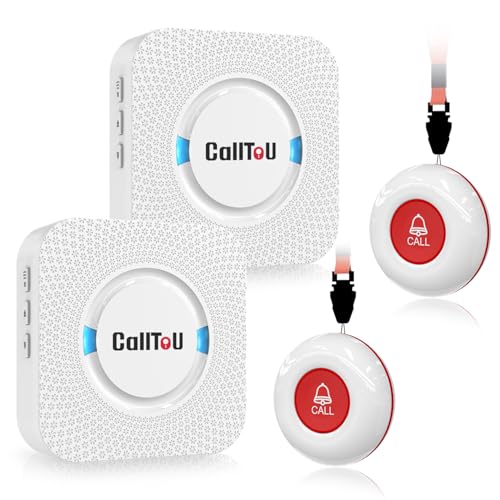
This CallToU kit is one of the strongest choices for everyday home care. It includes two wireless call buttons, so a user can keep one near the bed and one in the bathroom or living room. The receiver gives a loud alert that can help a caregiver hear the call from another part of the home. Its claimed 500-plus-foot range applies to open space, so walls, floors, and building materials can reduce that distance.
The call buttons are waterproof, which makes them more useful near a sink, shower, or kitchen. The design also stays simple for older adults who do not want a phone app. I like this setup for families that need two call points without adding a complex system. It is a practical pick for many buyers seeking the best wireless caregiver pager for basic daily support.
Pros:
- Two call buttons support two important rooms.
- Loud whole-home alerts can be easier to hear.
- Waterproof buttons suit kitchen and bathroom use.
- No Wi-Fi setup is needed.
- Simple controls help reduce user confusion.
Cons:
- Actual range may drop in homes with thick walls.
- The receiver still needs a suitable power location.
- It does not provide app-based remote alerts.
What Amazon Buyers Are Saying
Buyer feedback commonly focuses on easy setup, loud alerts, and the value of having two buttons. Many home-care users like the direct call process because it avoids a smartphone. Some complaints in this product category mention range changes between rooms, button battery needs, or alerts that seem too loud for a small space. I recommend testing the system in the exact rooms where the user will need it.
My Recommendation
I recommend this model for a parent, spouse, or patient who needs a clear call method in more than one room. It gives useful coverage without an app or monthly service. It is worth buying when simple local alerts matter most.
CallToU Pager with Two Receivers

This CallToU system includes one waterproof SOS button and two plug-in receivers. That layout helps when caregivers spend time in separate rooms. You can place one receiver near a bedroom and another near a kitchen, office, or living area. The product lists a 500-plus-foot range, but real results depend on walls and interference.
The single button keeps the user experience clear. A senior only needs to press one large call point when help is needed. This can work well for a person who stays in one main room while family members move around the house. It is less useful if you need different buttons to identify different users or rooms.
Pros:
- Two receivers improve alert access around the home.
- Waterproof SOS button supports common care areas.
- Simple one-button operation is easy to explain.
- No internet connection is required for basic alerts.
- Useful for homes with more than one caregiver area.
Cons:
- Only one call button is included.
- Plug-in receivers need open outlets.
- Range claims may not match every floor plan.
What Amazon Buyers Are Saying
Common buyer themes for this type of kit include fast setup and the convenience of hearing an alert in two places. Users often value the waterproof button for an older adult who may need help near a bathroom. Reported concerns can include outlet placement, battery replacement, and signal strength in larger or older homes. Check the return terms and test the range early.
My Recommendation
This is a good choice when one person needs help and caregivers stay in different parts of the house. The two receivers add real value. I would choose it over a single-receiver kit for a large home.
CallToU Wi-Fi Pager with Two Buttons
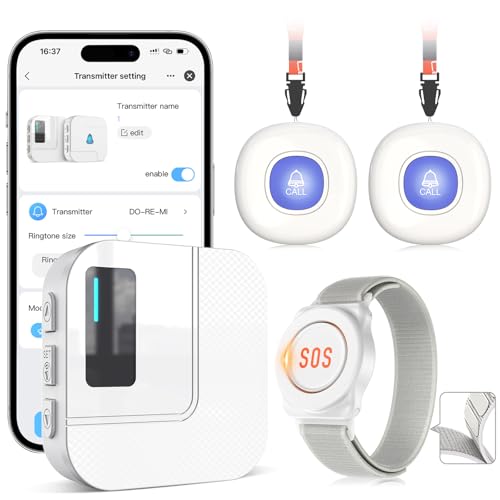
This Wi-Fi CallToU system adds app alerts to local caregiver communication. The package includes two call buttons, one watch button, and one receiver. It uses a 2.4GHz Wi-Fi connection, a band supported by many smart-home routers. The app feature can help a caregiver receive a notice while away from the receiver.
Wi-Fi adds convenience, but it also adds setup steps. The home internet must work, the app must be configured, and the user must keep a compatible phone available. I would select this system for families who want both a local receiver and phone-based awareness. It is not the best fit for someone who wants a pager that works with no network.
Pros:
- App alerts can extend awareness beyond one room.
- Two call buttons suit more than one care location.
- A watch button may offer a wearable call option.
- A local receiver provides an in-home alert.
- Useful for caregivers who already use smart devices.
Cons:
- Wi-Fi setup may challenge some older users.
- Internet or app problems can affect remote alerts.
- It may require more phone permissions and maintenance.
What Amazon Buyers Are Saying
Buyers who prefer connected care often praise the added app function and the range of alert choices. Some users find the setup less direct than a basic radio-frequency pager. Common concerns for Wi-Fi systems include pairing, router compatibility, notification settings, and dependence on an internet connection. I suggest setting up the app before relying on it for urgent daily care.
My Recommendation
This is a strong option for a tech-ready family that wants alerts at home and on a phone. It offers more flexibility than a basic pager. I would not choose it if the caregiver needs a fully offline system.
Six-Button LED Number Pager

This system targets homes, clinics, and care settings with several call points. It includes six waterproof call buttons and two receivers. The LED number display helps show which button sent the alert. That feature can save time when buttons sit in different rooms or serve different people.
The larger setup needs more planning than a one-button pager. I would label each button and create a simple placement plan before installation. The listed 500-foot range suits many homes, though walls can reduce it. This is one of the most useful choices for a family caring for several people or monitoring several rooms.
Pros:
- Six buttons support many rooms or users.
- Two receivers spread alerts across the building.
- LED numbering helps identify the call location.
- Waterproof buttons suit busy care environments.
- Useful for home, clinic, or small facility use.
Cons:
- More buttons require careful labeling.
- The system may be too large for one user.
- Battery checks become more important with six buttons.
What Amazon Buyers Are Saying
Buyers who need several call stations tend to value the button count and number display. The system can make it easier to know where help is needed before walking to the caller. Some users may find the setup and battery management demanding. Reviews for multi-button systems also often stress the need to test every button after installation.
My Recommendation
I recommend this model for multi-room or multi-person care. It gives more information than a simple bell. For one older adult in a small home, it may offer more capacity than necessary.
CallToU Two-Way Intercom Pager

This CallToU model works more like a home intercom than a one-way alarm. It gives users a way to call and speak with a caregiver. That can help answer a quick question before someone walks across the house. It may also reduce needless trips when the user only needs simple help.
Two-way voice has clear benefits, but it can take practice for a person with hearing or speech limits. I would place the units where both people can reach them with ease. This product suits families who want communication as well as an alert. It is not a direct replacement for emergency services or medical monitoring.
Pros:
- Two-way voice can support quick conversations.
- May reduce unnecessary trips across the home.
- Useful for seniors and adults who can use voice controls.
- Supports room-to-room communication.
- Offers more interaction than a basic call bell.
Cons:
- It may be harder for users with hearing loss.
- Voice communication needs quiet placement.
- Water resistance is not clearly stated in the listing.
What Amazon Buyers Are Saying
People who choose intercom-style care products often like the ability to talk before responding in person. Buyers may also value the simple room-to-room design. Potential complaints include sound level, background noise, and the learning curve for two-way use. I would test voice clarity at the normal distance before making it the only way to request help.
My Recommendation
This is worth considering when conversation matters as much as the call signal. It suits an alert user who can speak and listen clearly. For a person who needs only a large push button, a standard pager may work better.
CallToU Basic Home Care Pager

This basic CallToU pager focuses on the core task: pressing a wireless button to alert a caregiver. It lists a 500-plus-foot through-wall range and includes a waterproof call button. The design avoids app accounts, complicated pairing, and extra controls. That makes it appealing for a senior who needs a clear and familiar routine.
A simple system can be the right system. I like this model for a bedroom, apartment, or small home where one button meets the need. The caregiver should still keep the receiver in a place where its alert can be heard. Families should also explain that the pager does not replace emergency calling or supervision.
Pros:
- Simple design is easy to teach.
- Waterproof button supports bathroom use.
- Long-range claim suits many home layouts.
- No Wi-Fi or monthly plan is needed.
- Good fit for basic daily assistance.
Cons:
- One button limits room coverage.
- It lacks app alerts and remote notifications.
- Users must keep the receiver within hearing range.
What Amazon Buyers Are Saying
Common buyer feedback for this type of product praises its direct operation and quick setup. Families often want a call button that an older adult can understand without a phone. Some users report that sound levels and range depend on the home. Battery life and receiver placement also appear as practical concerns buyers should plan for.
My Recommendation
This is one of my favorite low-complexity choices. It works well when one person needs one dependable button. I would buy it for simple home care rather than advanced monitoring.
CallToU Wi-Fi Single-Button Pager

This compact Wi-Fi system includes one call button, one watch button, and one receiver. It aims to give one person several ways to contact a caregiver. The 2.4GHz Wi-Fi connection supports app-based emergency alerts. The watch button may help when the user moves around and cannot reach a wall or bedside button.
The single-button format keeps the kit focused. It may suit a small home or one older adult who needs mobile access. The main trade-off is dependence on network and phone settings. I would use the local receiver as the main alert and treat the app as an added layer, not the only safety plan.
Pros:
- Wearable and fixed call options add flexibility.
- App alerts may help caregivers away from home.
- One-user setup keeps the system focused.
- A local receiver provides an in-home backup.
- 2.4GHz Wi-Fi suits many home routers.
Cons:
- It needs Wi-Fi and app setup.
- Remote alerts depend on phone notifications.
- It includes only one main call button.
What Amazon Buyers Are Saying
Buyers interested in connected care often like the watch option and phone alerts. The most likely areas of concern involve setup, network pairing, and notification permissions. Some families may prefer the system after a short learning period, while others may find a non-Wi-Fi pager easier. I suggest involving the regular caregiver during installation.
My Recommendation
This model makes sense for one active user and a caregiver who wants app support. It is not my first choice for a user who dislikes smart devices. Its value depends on reliable Wi-Fi and careful setup.
CallToU Bell Alert Pager

This bell-style CallToU pager offers a broad set of alert choices. The listing includes up to 55 chimes, flashing light alerts, a 0-to-100 dB volume range, and low-battery warning. It also lists an IP55 waterproof rating for the call button. These features help caregivers adjust the alert to the room, user, and time of day.
The no-Wi-Fi design keeps the main system easy to use. A flashing light can help when sound is not ideal, while a lower volume may suit nighttime use. The large choice of chimes can help a family tell this alert apart from other sounds. I see it as a flexible home pager for buyers who care about sound and visual settings.
Pros:
- Many chime choices allow personal setup.
- Adjustable volume supports different home needs.
- Flashing light adds a visual alert.
- Low-battery warning helps with maintenance.
- IP55-rated button adds water resistance.
Cons:
- Many settings may confuse some users.
- It does not provide phone-based alerts.
- Water resistance does not mean the button suits deep water.
What Amazon Buyers Are Saying
Buyers tend to appreciate adjustable sound, visual alerts, and the lack of a monthly fee. Families may also like the low-battery notice because missed alerts can create stress. The usual concerns involve choosing the right chime, setting volume, and placing the receiver where the light remains visible. Read the setup directions and test both sound and light modes.
My Recommendation
I recommend this pager for homes that need flexible sound and light alerts. It offers more control than a basic bell. It is a good value if you will use those extra settings.
CallToU Battery-Powered Caregiver Pager

This CallToU kit includes two call buttons and a battery-powered receiver. That design can help in a home where outlet access is limited. It may also offer more flexibility during a power outage or when the caregiver moves between rooms. The buttons are described as waterproof, which supports use near common care areas.
Two buttons let a user keep one alert point near the bed and another in a high-use location. The receiver can travel with the caregiver instead of staying in one outlet. Battery use adds one more task, so I would set a regular check date. This model is especially practical for households that value mobility.
Pros:
- Battery-powered receiver supports portable use.
- Two buttons cover separate care locations.
- Waterproof buttons suit kitchen and bathroom areas.
- Easy setup avoids Wi-Fi concerns.
- Helpful during limited outlet access or outages.
Cons:
- The receiver needs regular battery checks.
- Battery cost can add up over time.
- It lacks app and remote alerts.
What Amazon Buyers Are Saying
Buyers often like the freedom to carry the receiver and place buttons where they matter most. The two-button layout also earns attention from families who want more than one call point. Likely complaints focus on battery life, alert volume, and range through dense walls. I would keep spare batteries available and test the system after changing them.
My Recommendation
This is a smart pick for caregivers who move around or need a system that does not rely on a wall outlet. It gives useful flexibility at home. Choose another model if you prefer a plug-in receiver with less battery upkeep.
MERLRR Portable Vibration Caregiver Pager

The MERLRR pager stands out because its portable receiver offers ring, vibration, and LED alerts. That mix can help a caregiver who works, rests, or moves around the home. The listing gives an 800-plus-foot range claim, but I treat that as an open-area estimate rather than a promise for every house. A portable receiver can make a major difference in daily use.
Vibration is useful when sound would disturb others or when the caregiver wears the receiver nearby. LED alerts add another way to notice a call. This type of design may suit bedrooms, yards, kitchens, and larger homes. I would confirm how the receiver clips or travels before purchase if portability is your main need.
Pros:
- Vibration alerts support quiet care.
- Ring and LED modes add choice.
- Portable receiver follows the caregiver.
- Long-range claim suits larger spaces.
- Useful for rest periods and busy routines.
Cons:
- Button water resistance is not clearly stated.
- Portable electronics still need battery care.
- Vibration may be missed if the receiver is not worn nearby.
What Amazon Buyers Are Saying
People who need quiet alerts often look for vibration first, and buyers commonly value that feature in this style of pager. Users may also like the LED signal and portable form. Possible concerns include clip comfort, vibration strength, and signal performance across floors. I suggest testing the receiver while wearing it in the places where the caregiver spends the most time.
My Recommendation
This is my preferred option for a caregiver who needs quiet, portable alerts. It offers more alert modes than many simple kits. I would not make it the only choice for a user who needs a clearly waterproof call button.
How to Choose the Best Wireless Caregiver Pager
Choosing the best wireless caregiver pager depends on the user, the home, and the caregiver’s routine. I would not pick a system based on range alone. A useful pager must be easy to press, easy to hear, simple to maintain, and suited to the rooms where care takes place. Use the points below before ordering.
1. Match the Call Button to the User
Start with the person who will press the button. A large, simple button works well for many seniors. A wearable button may suit someone who walks around the house. Two buttons help when the user spends time in separate rooms. If several people need help, look for a multi-button system with an LED number display.
Think about hand strength, vision, hearing, and memory. A complex app may frustrate a person who only needs one clear call. A small button may also prove hard to find at night. Place the button near the bed, chair, bathroom, or kitchen based on the user’s real routine.
2. Check Range, Alerts, and Power
Pager listings often state a long open-space range. Your home may provide less range because of brick, concrete, metal, floors, and other wireless devices. Test the system in each needed room. Do not assume that a 500-foot or 800-foot claim means the same distance through walls.
Next, compare alert types. Loud sound works well for many caregivers. Flashing lights help people who may not hear a tone. Vibration helps during sleep, work, or quiet periods. Plug-in receivers suit fixed rooms, while battery receivers offer more freedom. Wi-Fi systems can send app alerts, but they need a working network and a configured phone.
3. Consider Water Resistance, Maintenance, and Value
A waterproof or water-resistant button can help near a bathroom or sink. Check the exact rating. Water resistance does not always mean a device can go under water. Keep the receiver dry unless the product guide says otherwise.
Plan for batteries before you buy. Ask how many buttons use batteries and how often you will check them. Low-battery alerts add useful warning. Also consider whether the system has a monthly fee. Basic radio systems often avoid subscriptions, while app systems may require more setup and phone care.
Finally, treat a caregiver pager as a home communication aid, not a medical emergency service. It may not contact 911, detect a fall, or work during every power or network failure. Test it often, keep emergency numbers nearby, and follow the care plan made with the user’s health professional.
Final Verdict: Which Should You Buy?
For most homes, I recommend the CallToU two-button pager or the two-receiver version. The MERLRR is better for quiet vibration alerts, while the six-button kit suits several rooms or users.
The best wireless caregiver pager is the one the user can press and the caregiver can notice. Choose a simple, tested system that fits your home and daily care plan.
FAQs Of best wireless caregiver pager
What is the best wireless caregiver pager for home use?
The CallToU two-button system is a strong home choice because it offers two call points, loud alerts, and waterproof buttons without Wi-Fi setup.
Do wireless caregiver pagers work through walls?
Many models list through-wall range, but walls, floors, brick, concrete, and interference can reduce performance. Test the pager in your own home.
Is a caregiver pager better than a medical alert system?
A pager suits local home communication. A medical alert system may offer emergency response, fall detection, or monitoring. They serve different needs.
Can a wireless caregiver pager work without Wi-Fi?
Yes. Many basic radio-frequency pagers work without Wi-Fi or a monthly fee. Wi-Fi models need a router and app setup for connected alerts.
What features matter most in a caregiver call button?
Look for a large button, clear alerts, suitable range, water resistance, simple setup, and power options that match the user and caregiver.

Michael Reynolds is a senior contributor at RetirementGazette.com, where he focuses on helping readers navigate the journey toward a secure and fulfilling retirement. With over a decade of experience in personal finance, retirement planning, and lifestyle writing, Michael combines practical strategies with easy-to-understand guidance tailored for both pre-retirees and those already enjoying their golden years.